Specifications

To get access to the Database files from the paths, you need to provide valid credentials. Username and password are equal to your personal API Key which you can obtain from the My Products page.

The database comes in the following forms

  • Scored Email Domains: a daily updated list of email domains with a 0–100 confidence score, a classification, an indicator of whether MX records were seen, and the date of the last MX check.
    • Classification bands: disposable (92–100), likely-disposable (62–92), unknown (42–62), free (0–42).
    • Base path: https://download.whoisxmlapi.com/datafeeds
    • Format: "disposable-emails-scored.full.%DATE%.csv" and "disposable-emails-scored.full.%DATE%.json", e.g. "disposable-emails-scored.full.2026-07-28.csv".
    • A new file is available daily by 13:00 UTC.
    • Samples: disposable-emails-scored.full.2026-07-28.sample.csv, disposable-emails-scored.full.2026-07-28.sample.json
    • File fields:

      JSON files carry the same fields in camelCase: domain, confidenceScore, classification, mxSeen, mxChecked, modelVersion.

      Field Type Description
      domain string The domain, lowercase. Punycode (xn--) for internationalized domains.
      confidence_score integer, 0–100 Model confidence that the domain is disposable. Higher values mean more likely disposable. Empty for a small residue (~0.1%) whose nameservers are permanently unresponsive.
      classification string One of "disposable", "likely-disposable", "free", "unknown".
      mx_seen boolean Whether live mail infrastructure was observed at the last check. Empty means not established, not "no mail server".
      mx_checked date When MX liveness was last checked, in the standard format (YYYY-mm-dd), e.g. 2026-07-22.
      model_version string Fingerprint of the scoring model that produced the score. Empty on rows not yet re-scored under a stamped model.
  • Disposable Email Domains: a daily updated list of disposable email domains.
  • Free Email Domains: a daily updated list of free email domains.

How to download the datafeed files

Recommended decompression tool

When working with large compressed files, we recommend using unpigz rather than gunzip. Based on our performance tests, gunzip can be almost 2x slower than unpigz for large files. For this reason, unpigz is the preferred decompression tool.

Downloading via HTTPS

Note: if the IP allowlist is enabled in your account settings, HTTPS downloads are accepted only from the listed IP addresses; other requests are rejected with 403 "Your IP address is not on the allowlist".

Downloading via FTP

Note: if the IP allowlist is enabled in your account settings, it applies to data feed downloads as well as to API calls: FTP, FTPS and HTTPS requests from IP addresses that are not on the list are rejected with 403 "Your IP address is not on the allowlist". Add the IP addresses of every machine that downloads the data feeds before enabling it.

Downloading via FTPS

Read more about the FTPS connection: https://en.wikipedia.org/wiki/FTPS.

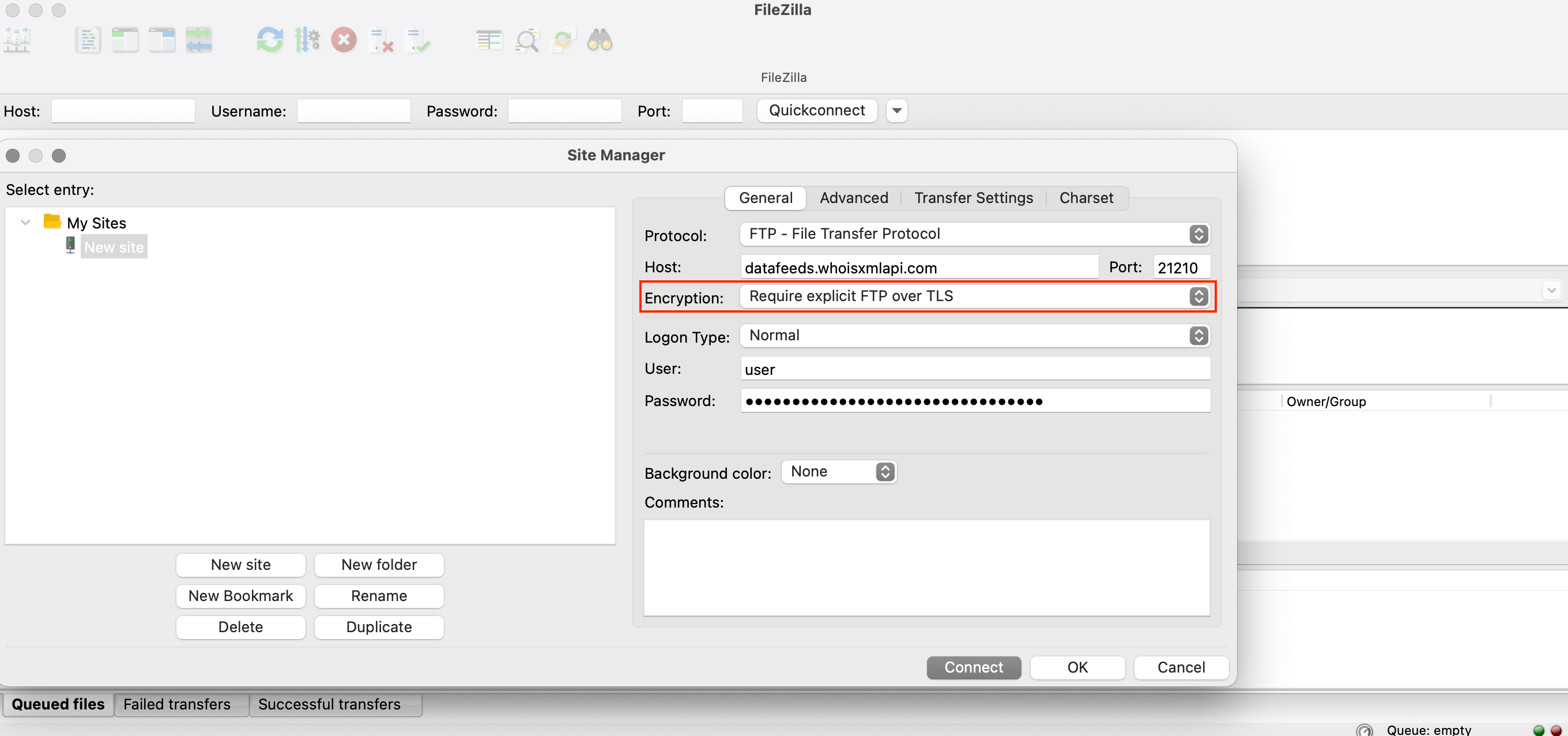
Our FTP server supports explicit FTP over TLS encryption. You may configure your FTP client to use explicit FTP over TLS encryption for secure communications.

Our FTPS server is accessed using the same paths and API keys as a regular FTP server, the instructions for which are described above. To connect via FTPS, select the "Require explicit FTP over TLS" encryption option in your FTP client, if it supports it. FileZilla configuration example:

explicit FTP over TLS encryption